Contact

POCKET

The all in one mobile app for finding University resources.

Students have difficulty accessing the many resources available to them while enrolled, whether due to a lack of awareness or complicated accessibility. Pocket is an app that helps students discover relevant resources and take full advantage of the wide range of opportunities available to them.

PROBLEM STATEMENT

76% of students* are unaware of the resources available through their enrollment, such as academic tools, basic needs services, and school-wide events. Because information about these resources is scattered, 95% of students* have missed opportunities, limiting the value they get from their university experience.

THE OUTCOME

+60%

Faster resource finding

-80%

User frustration

200      1

Sources consolidated

ROLE

Product Lead &
UX Designer

TIMELINE

8 weeks

TEAM

1 Product Lead, 2 UX Designers, 2 Developers, & 1 Researcher

WHAT I DID

I coordinated the team and conducted usability testing, designed and iterated on multiple screens, and turned user feedback into outcomes throughout the project.

THE PROBLEM

Every semester, students are unaware of hundreds of available resources.

Most student resources are hidden behind links and chance, making it hard for students to make the most out of their academic experience. Most resources go unknown by students.

PROBLEM 01

Resource information is fragmented across 200+ locations e.g. websites, social media pages, and emails

PROBLEM 02

Too many clicks, searches, and decision points discourages users from completing their search

PROBLEM 03

Awareness is often dependent on chance encounters, leading to unequal access to information & support

WHY IT MATTERS

95.7% of students have missed valuable opportunities and resources.

The current approach to resource discovery has fundamental flaws, as excess friction exists between students and relevant resources. Below lies a diagram which highlights this problem through a typical student experience.

CURRENT STATE

Finding support shouldn't feel like another assignment.

Navigating dozens of links means adapting to a new mental model every few minutes, increasing cognitive load and frustration while they search across inconsistent and outdated interfaces for help.

INITIAL IDEATION

User-centered thinking from beginning to end.

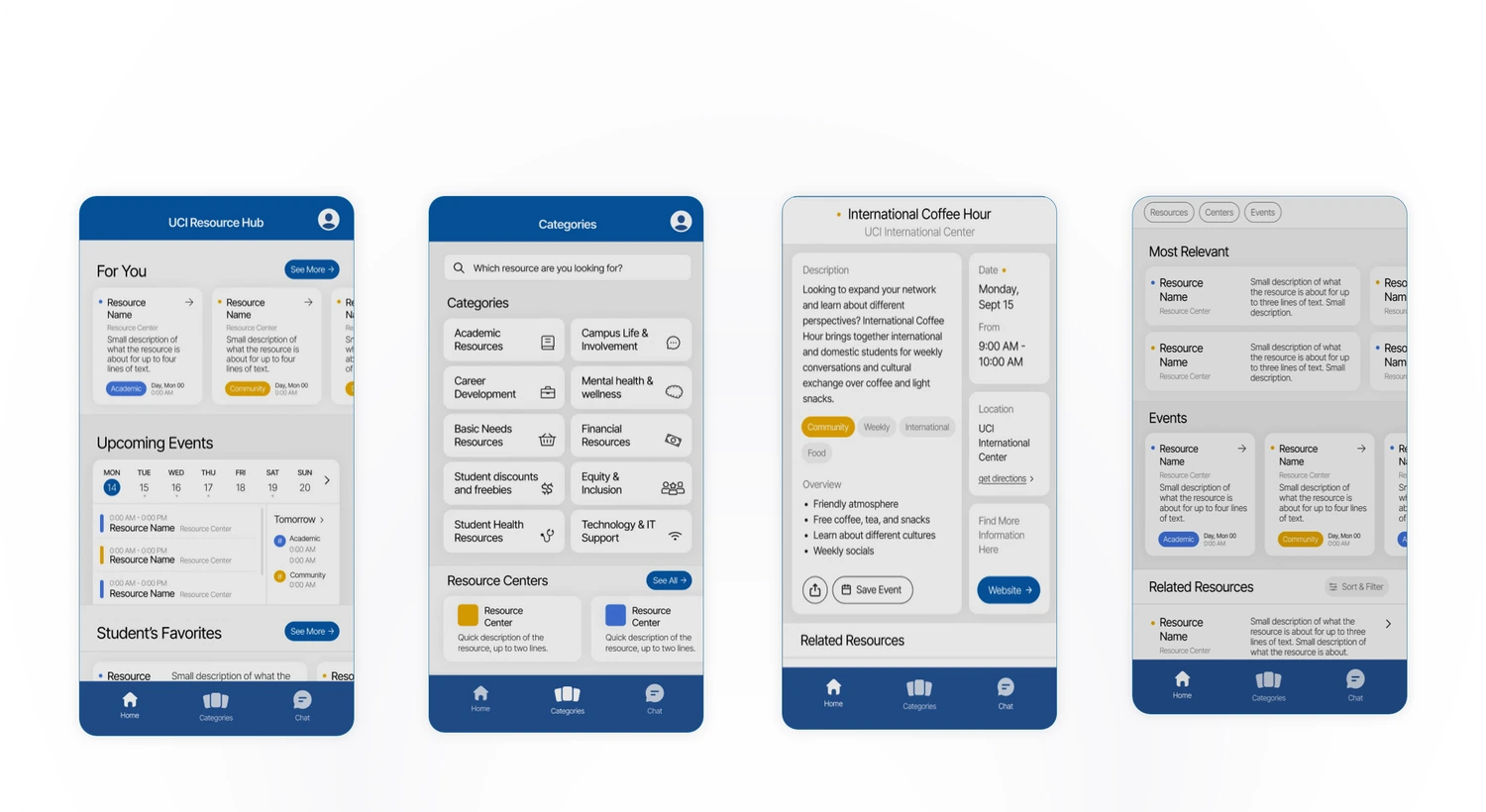
From the beginning, a user-first perspective shaped our solution. Insights from our discovery survey, combined with UX principles helped validate early ideas and align our vision with what students needed most.

Ideas & Vision
The focus has always been: everything in one place. Students should instantly see what's relevant, what's soon, and be able to search for anything else, with no friction. A user onboarding and tokenized resources ensured the most relevant resources are surfaced.
Discovery survey
To validate our assumptions, we surveyed students and alumni on how they found resources. The findings confirmed that existing methods were inadequate, with 95.7% of students sharing that they've missed opportunities due to a lack of awareness.

PLATFORM SELECTION

Pocket: The decision behind a mobile-first experience.

A mobile-first solution provided the strongest foundation for delivering the features and impact students needed most. With a limited timeline, a mobile MVP let us maximize the value students would receive.

01

Meeting students where they are
69.6% of students preferred using a mobile device over a desktop to discover university resources, making mobile the ideal platform for our MVP.

02

Support anytime, anywhere
With phones a part of students' daily lives, mobile provides the most accessible, lowest-friction way to access support.

03

Keeping students connected to support
Push notifications, sharing, and future integrations help students stay informed and take action on resources.

RESEARCH PLAN

User behavior and feedback drove each decision.

Ongoing user research kept us focused on what mattered most: key pain points and areas of impact. Both quantitative and qualitative findings guided each iteration of Pocket.

Research Process

01

Discovery survey
Week 1
We surveyed students and alumni to understand resource discovery behaviors. Findings confirmed existing methods were inefficient and unreliable, leading to missed opportunities and lack of resource awareness.

02

Usability testing - Round 1
Week 5
Using our mid-fidelity prototype, five participants had to complete nine tasks, covering discovery, and resource exploration to identify usability issues and areas of friction.

03

Usability testing - Round 2
Week 6
After iterating on the design, we retested with three new participants. Results showed improved task success, faster task completion, and a smoother overall experience.

04

Benchmark study
Week 7
We tested Pocket against existing resource-finding methods with four participants. Results showed reduced friction, improved usability, and higher satisfaction.

MVP STRATEGY

Research and insights shaped our priorities & features.

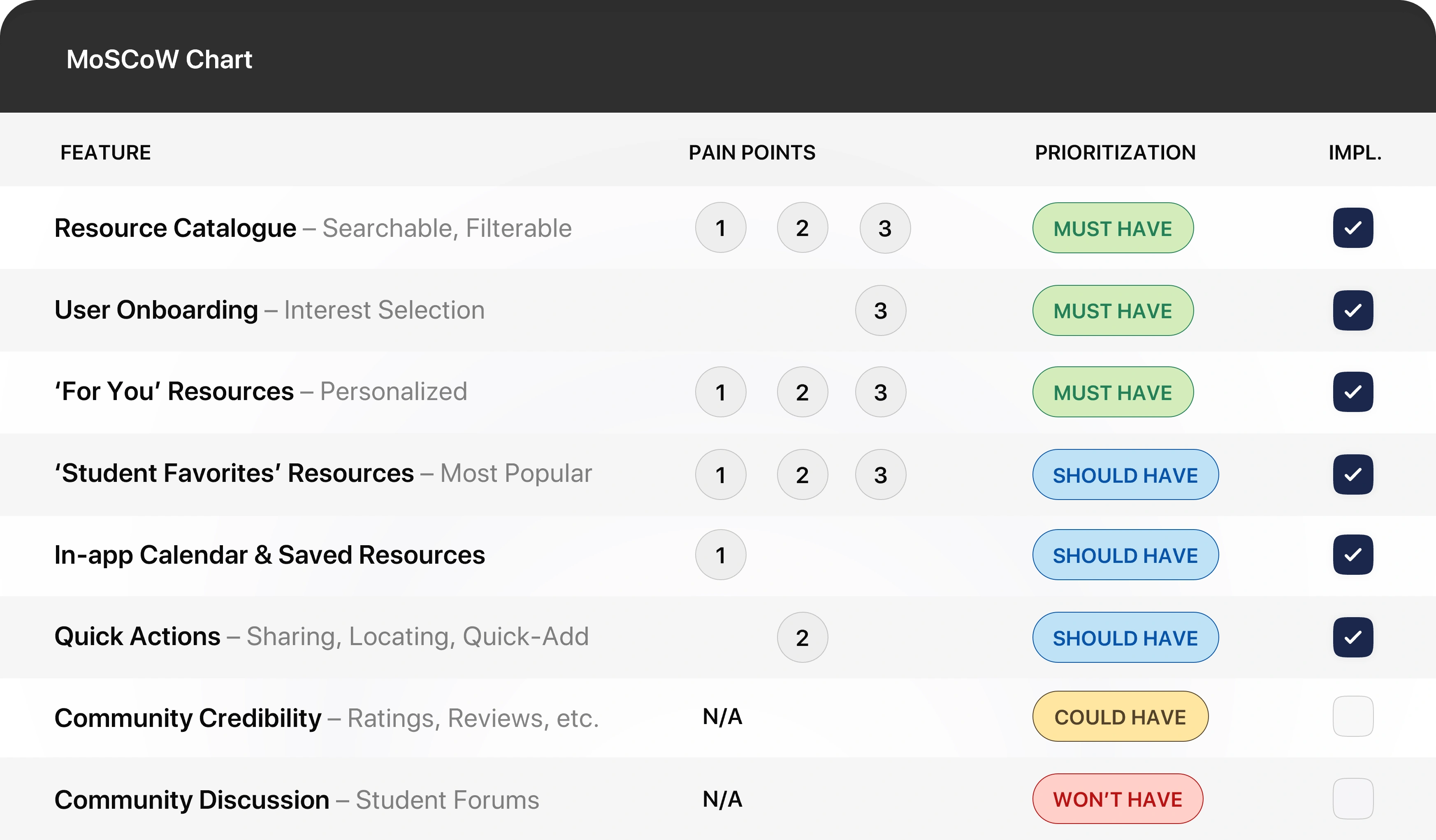
With 8 weeks to build, it was important to prioritize impact over feature bloat. MVP thinking kept the most impactful student needs and pain points at the center of every design decision.

Pain Point 1  Fragmented Information   •   Pain Point 2  High Friction   •   Pain Point 3  Chance Awareness

SOLUTION HIGHLIGHTS

Pocket: A simpler, more efficient way to discover student resources

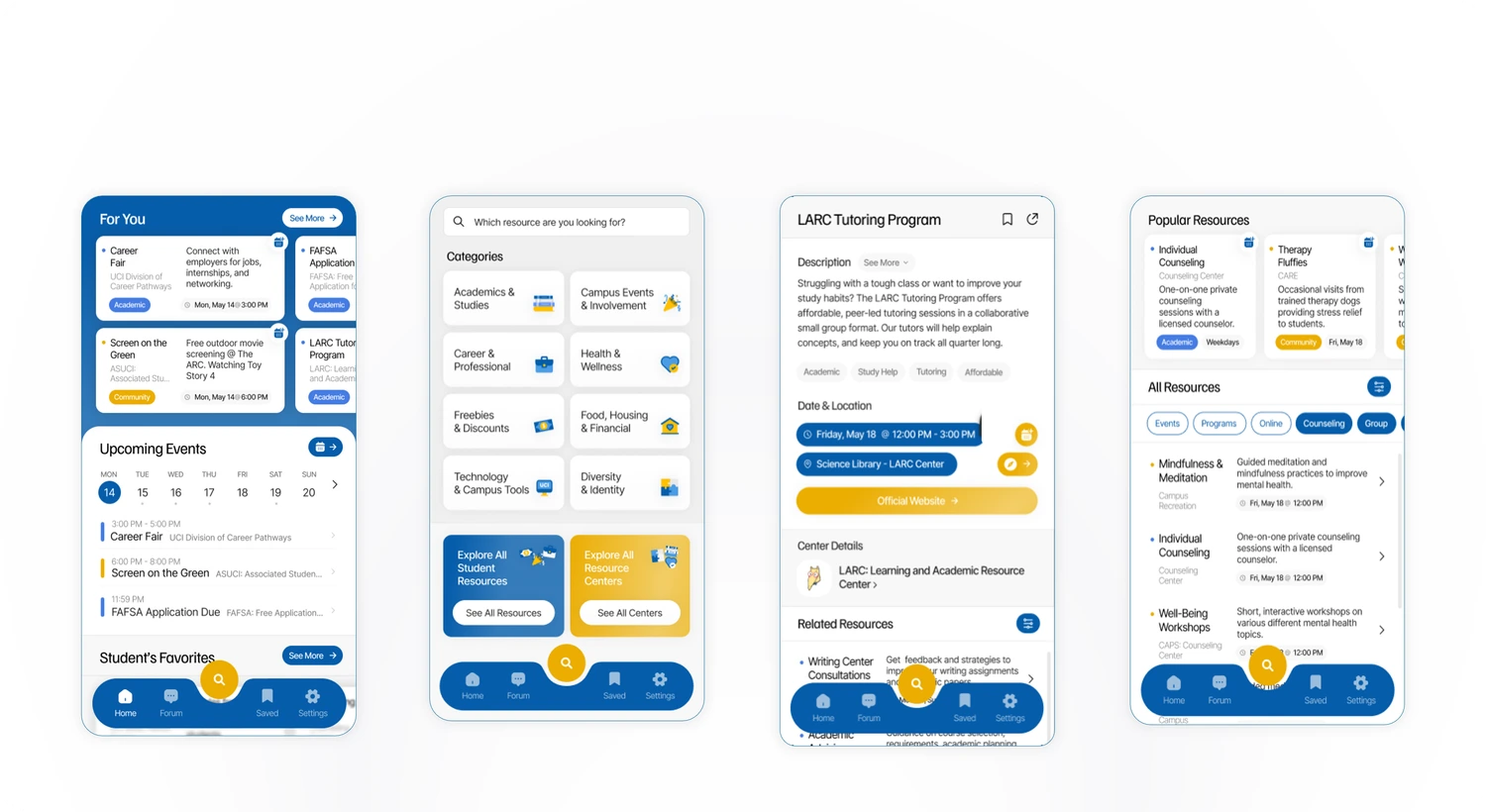
Each user insight directly informed a feature, ensuring every feature contributed to solving a meaningful user need. Every aspect of Pocket was intentionally designed to make resource discovery simpler and more effective.

Pain Point 1  Fragmented Information   •   Pain Point 2  High Friction   •   Pain Point 3  Chance Awareness
01: Smart Home Screen
Designed for High Value, Low Effort. Students wanted resource-finding to be simple and convenient. I designed the home screen to surface the most important information the moment they opened the app.

01

For You - Personal Picks
1
2
3
The For You section proactively surfaces resources based on students' chosen interests, directly lowering the amount of missed student opportunities.

02

Upcoming Calendar
1
The In-app Calendar bridges the gap between discovery and participation, allowing users to see what is soon without navigating multiple pages or apps.

03

Student's Favorites - Popular Picks
1
2
3
Student Favorites highlights commonly used resources, reducing the effort needed to find valuable resources. Users can choose through trusted resources.

04

One-Tap Explore
1
2
3
The Explore button is positioned prominently within the navigation bar, allowing students to quickly find what they need without excess steps.
02: Resource Catalogue & Searching
Designed for students who know what they’re looking for, and those looking to discover more. The catalogue provides multiple pathways to relevant resources.

01

Categories
1
2
3
The For You section proactively surfaces resources based on students' chosen interests, directly lowering the amount of missed student opportunities.

02

Search Bar
2
3
The In-app Calendar bridges the gap between discovery and participation, allowing users to see what is soon without navigating multiple pages or apps.

01

For You - Personal Picks
1
2
3
The For You section proactively surfaces resources based on students' chosen interests, directly lowering the amount of missed student opportunities.

02

Upcoming Calendar
2
The In-app Calendar bridges the gap between discovery and participation, allowing users to see what is soon without navigating multiple pages or apps.
03: Resource Info Pages
Designed to consolidate all relevant information in one place.  Students want their search to be simple and efficient, so I designed the Info pages to ensure students were only a few clicks away from helpful resources.

01

Quick Actions
1
2
Quick Actions allow users to quickly engage with resources. This includes bookmarking, sharing, adding to calendar, locating, and more.

02

Resource Information
1
Most relevant resource information is available in the app, ensuring the app connects students to relevant resources quickly and efficiently.

03

Resource Center
1
2
3
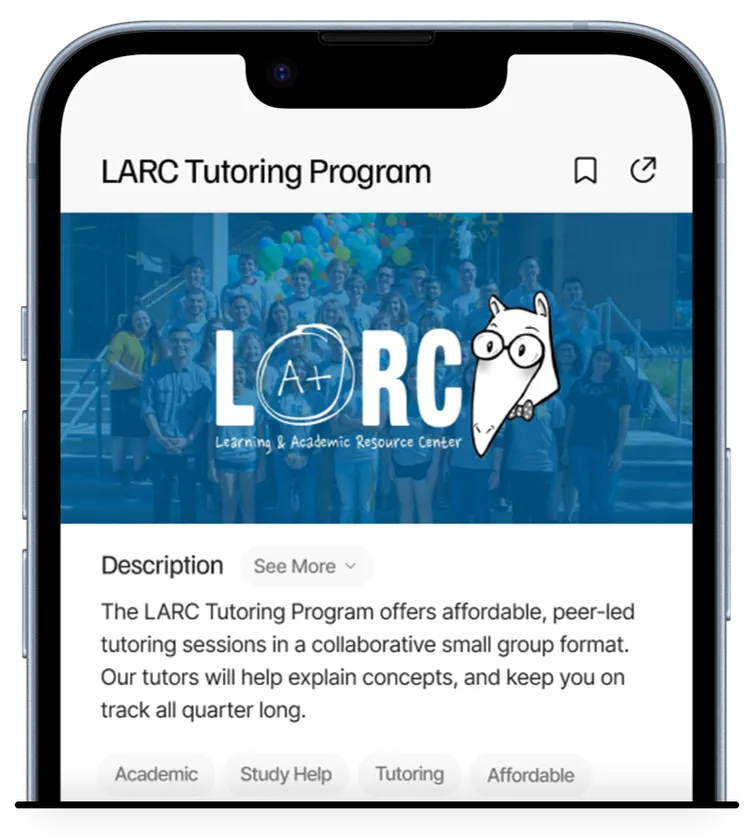
Easy access to the resource’s associated center allows students who discover one useful resource to benefit from additional resources offered by the same center.

04

Related Resources
1
2
3
The Related Resources section increases the likelihood of finding a resource that fits each students’ needs. Students are encouraged to keep exploring resources.

TESTING INSIGHTS & OUTCOMES

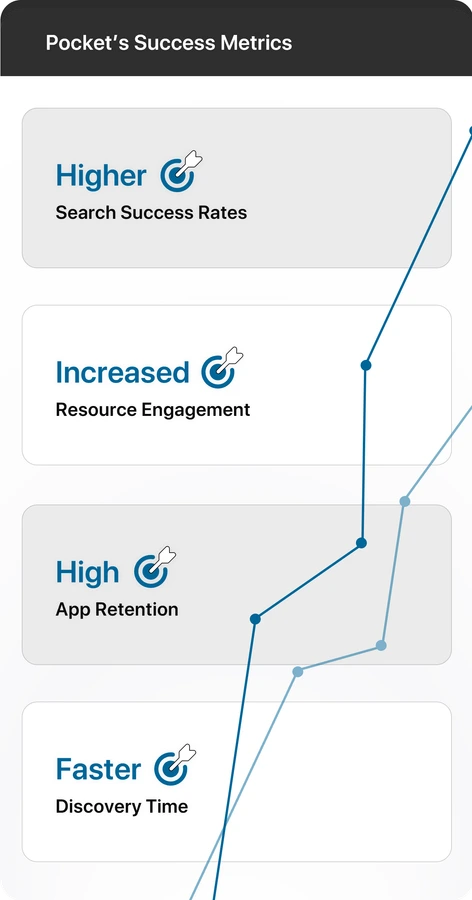
These changes led to faster, more intuitive resource-finding.

With 8 weeks to build, it was important to prioritize impact over feature bloat. The design thinking framework kept students at the center of every decision.

+60%

Faster resource finding

+40%

Faster resource finding

+80%

Faster resource finding

01

Discovery survey
Week 1
With 8 weeks to build, it was important to prioritize impact over feature bloat. The design thinking framework kept students at the center of every decision.

01

Discovery survey
Week 1
With 8 weeks to build, it was important to prioritize impact over feature bloat. The design thinking framework kept students at the center of every decision.

01

Discovery survey
Week 1
With 8 weeks to build, it was important to prioritize impact over feature bloat. The design thinking framework kept students at the center of every decision.
Discovery survey
Week 1
With 8 weeks to build, it was important to prioritize impact over feature bloat. The design thinking framework kept students at the center of every decision.
Discovery survey
Week 1
With 8 weeks to build, it was important to prioritize impact over feature bloat. The design thinking framework kept students at the center of every decision.
Discovery survey
Week 1
With 8 weeks to build, it was important to prioritize impact over feature bloat. The design thinking framework kept students at the center of every decision.

FUTURE PLANS

Pocket has the potential to scale across universities worldwide.

Pocket targets a common challenge experienced by students, positioning it to scale beyond a single university. Future growth and initiatives will ensure more students access the support they need.

Expanding Pocket

01

Institutional Partnerships
Adoption across institutions grows Pocket's impact and supports long-term scalability.

02

University systems integration
Enable single sign-on (SSO) with university credentials for faster, more seamless access.

Improving Pocket

03

Launch with real users
To validate adoption, usability, and whether Pocket solves the resource discovery problem at scale.

04

Cross platform integration
To make it easier for students to save resources to their preffered apps and share via messaging, email, etc.

05

Admin dashboard
For university staff and organizations to manage, update, and add resources.

REFLECTION & KEY TAKEAWAYS

A design process built on learning and iteration.

Research before solutions
Early research removed uncertainty around what the core issues were and provided direction for a solution. Prioritizing student pain points allowed us to provide a real impact.
Test early and often
Iterative testing allowed us to validate our ideas before we spent too much time on them, allowing for quick and easy pivots. Each round of feedback provided valuable insights that improved the solution.
Strong leadership starts with a shared vision
A shared vision kept our team aligned, enabling momentum towards faster and more meaningful deliveries. Clear communication and guidance kept our team working towards the right outcome.
Ideas are meant to evolve
Not every concept is final, and every design decision should be validated. Putting user needs ahead of our preferences challenged us to rethink ideas and explore solutions that maximized value for students.

OrderNau

Website

Sole Designer

Independent redesign of a Logistics and Fulfillment Company based in Lisbon. Delivered a new visual identity and full website design in order to improve their credble presence and customer acquisition.

Explore another project:

Privacy Policy

This site collects the information you submit through the contact form — your name, email address, and message — solely to respond to your inquiry.

Your information is not sold, rented, or shared with third parties for marketing purposes. It may be processed by the service used to handle form submissions, strictly to deliver your message and send you a confirmation.

Your data is retained only as long as needed to respond to you, and you can request that it be deleted at any time by reaching out directly.

This site does not use tracking cookies or third-party advertising trackers beyond standard, anonymized analytics (if enabled) to understand site traffic.

If you have questions about how your information is handled, feel free to get in touch using the contact form.